by scott ·
Jun 14 2008, 12:55 PM
categories: BuildIT Advantage
Need I say more?
Talked to a customer the other day paying over $5.40 a gallon (for you Canadians, just take your price per litre and multiply by 4, you'll get the idea). It's the price you pay to get your rig to the jobsite. It's part of your costs of doing business. And those costs are only increasing, with no end or relief in sight.
So what does this have to do with BuildIT?
Lots.
The vision of BuildIT from day 1 was the idea of a mobile office. Giving construction professionals access to their business information, scheduling, and communications "grand central" from their truck, the jobsite, or wherever they happen to be.
Take a trip to the local buider supply yard to meet with the salesperson there, or a trip back to the office to pick up some paperwork... multiply these needless trips by x $$ that it costs you in time, lost productivity, gas/diesel, extra miles on your lease - and you've bought a subscription to BuildIT many times over (and that's just the first month!)
Construction folks are looking for ways to save, now more than ever. And time is money, no matter how you slice it.
BuildIT saves you time, by giving you your office at your fingertips. Make timely decisions on your job scheduling right from the site, send out instructions to your subs and vendors by email/text msg or web fax, and keep track of all those slippery items from one central location. Take care of matters as they happen, avoid the costly screw-ups that happen because you waited too long, and didn't get the right information to the right person at the right time.
There is a big difference between now, and "right now" – having a web based system on your side allows you to take care of things "right now", so you don't waste time and money dealing with them "later", when you're back at the office, or back home. Imagine what you'll accomplish in the same amount of time?
Not to mention the fewer gallons you'll be burning doing things the way your competition does!
BuildIT retails for $85 per month – put that in your tank and see how far you'll go in a week. It's a no brainer – with your savings, you'll have more $$ to fill up the boat or ATV's on the weekend.
Try BuildIT for a month, and if you're not satisfied, I'll give you your $85 back and you can go "fill 'er up".
Scott Hutchinson (ex gas station attendant in my early years!)
scott@builditsystems.com
1 866 585 5050 ext 1
by scott ·
Jun 01 2008, 01:41 PM
categories: BuildIT Advantage
OK, time for us to jump on this bandwagon.
Even my kids are taking about the environment, polar bears on the endangered species list, and the Toyota Prius.
So where does BuildIT factor into all this?
Consider that:
- We are web based - no software to install, therefore no diskettes or CD's, boxes, packaging, printed manuals (that nobody reads anyways), shipping to your door by UPS. That'll make Al Gore happy.
- Our product is "information" (code; ones and zeros) put together in a way that gives you what you need most, when you need it. So, there is no offgassing, harmful emissions, ozone or rainforest depletion caused by our progress (although we have been known to "burn the midnight oil" occasionally).
- Our prinicpals and contractors work together as a virtual team, so none of us clog up the arteries at rush hour - we put all our time and effort into making BuildIT better for you.
- BuildIT by virtue of being web based, allows our customers to access their accounts from virtually anywhere, saving them needless trips to the office, or contractor supply yard. They get done more in less time, and burn less fuel in their trucks.
- We have geothermal companies that use or have invested in BuildIT - geothermal is all the rage now... get the heat from the earth in the winter, take it out of your home in the summer. They're obviously on to something, and so are we.
- When our customers use the system to share information, like files and schedules, there is less reliance on the old fashioned paper chase, copying of blueprints, snail mail, etc. We may never become totally "paperless", but we sure can reduce in that area, and save a tree at the same time.
OK, it may be a stretch, but as a customer, you can attest to the above "green advantages" and feel good about your subscription to BuildIT, not to mention the outstanding return on investment you'll realize.
Just to see if you're reading this, prove to me that you own either an energy efficient heating system (geothermal, solar) or hybrid automobile and I'll give you your first month subscription free, an $85 value - just tell me you want the "BuildIT Green discount".
Scott Hutchinson (can you guess my favorite colour?)
scott@builditsystems.com
1 866 585 5050 ext 1
by scott ·
May 20 2008, 01:06 AM
categories: On Construction Software
There is a lot of "free" software popping up on the Internet. You may have noticed this - you may be using some of it. Or you may be looking for it.
But what about "free construction software"?
Consider: a software company invests time, a lot of $$, and has programmers, support staff and perhaps commissioned sales staff - and they're offering you something free. What's the catch? Why would such an animal be offered?
I think it's because they're kind, and want to give back to the industry, and want to offer you something with no strings attached.
Rubbish.
They want users. And they want to convert those users, at some point, to "paid customers". Otherwise, what's the point? They're in business to make money. They need revenue - it's gotta come from somewhere.
You have a product. You have a customer. In the middle of that, there has to be a "price", or there's no revenue.
And if it's totally free, the full version - you have to ask yourself some questions, like "how good is this", "what about support", "will it meet my needs", "is it worth the risk to spend time figuring this out, have my team run off it, only to discover later it's buggy, or deficient in some way"?
Some software companies may lure you into a free "limited" version of their software. But who wants to be limited? You get to see part of the picture only, then realize later that you actually need to "upgrade" to get the functionality you need. Can you say "bait and switch"?
Think about it. You're in business to make money. If you're a contactor, you "contract" to do something, get paid a fair dollar for the time and materials you put into the project. This is your livelihood. Can you imagine offering to do a job for free, or expect your subcontractor to do a job for you, for free? Shouldn't you expect that a software system you need to move your business forward, or solve some critical business problems, is worth investing in?
Enough is written about the "service" side of software. It's one thing to have a CD, or access to a web based application, it's quite another thing to get your questions answered, your problems solved. And the best way to do that is still picking up the phone, and talking to someone who can help. Try calling BuildIT at 1-866-585-5050 ext 1 and test us - we'll answer the phone, 7 days a week (or if you call us in the middle of the night North America time, you'll get a return call within hours).
As for "best", "best in breed", or "the construction industry's #1 sofware"... words are cheap. I actually read about a new kid on the block, a construction software company with a funny name. They are still in beta, have a few contractors apparently that are testing their system, and claim these contractors are "beta testing what can only be described as the best construction management software ever made". Yikes - they don't even have a product available to the market yet, and somehow, they're the best. I'll give them top marks for self-affirmation, but really - it's not what they think about their software that matters.
The "best" construction software package is the one that you choose, use and get huge value from. The tragedy is the construction firm that spends $5 - $10K on a software product that never gets used. What a waste, and we see that all the time. That would buy a great vacation, why waste it?
Get some success under your belt before you buy. Take advantage of a free test drive. Make sure you understand the guarantee, if they have one. Ours is simple - if you don't think BuildIT is the best fit for your team in the first 30 days of being a customer, we'll refund your subscription, and part as friends. Period.
For the record, we've been around since 2000. We don't claim to be the best, or #1 anything (but many of our customers would make that claim about us ... see what they have to say on our proof page). But we have talked to 1000's of you over the years, have a loyal following of customers getting success with BuildIT, and have online scheduling, file management and communications nailed, with user feedback driving new development every week.
Wondering if BuildIT is "the best" for you? Take the next step - click the big green "Free Trial" button in the top right.
Scott Hutchinson (whose favorite numbers are 16 digits long and starting with a 4 or 5 !!)
scott@builditsystems.com
1 866 585 5050 ext 1
by scott ·
May 11 2008, 01:30 PM
categories: Kickass New Features
Getting the right information to the right person at the right time.
It's one of BuildIT's maxims. And it just got reinforced with some awesome new code.
File Sharing Made Easy
Files – Word documents, Excel spreadsheets, PDF's, drawings, photos, scanned images, whatever you have!
Every job has them. And the challenge often is making sure all the right parties get the right information they need.
Welcome to BuildIT's enhanced file sharing system. Now, you can actually 1) add files to tasks, and 2) share those files with anyone in your contact database via the free Contact Schedule for that contact.
Here's what you do:
- In the schedule for a job, add one or more files to a task (from the "do this" menu) or the paperclip on the task.
- Assign that task (if you haven't already) to someone in your contact database (client, sub trade, vendor, supplier, your mother-in-law, it doesn't matter).
- Send that contact a link to their Contact Schedule (we've made that easy too, just click the square Contact Schedule button next to the contact's name, and follow the instructions at the top of the page).
Your contact will see their schedule, and any associated files for individual tasks. They'll be able to view, print and save attachments. We built this in such a way as to protect your files - they can't delete them, or post updated files. That's your job. And if the file changes at your end, they'll see the latest version at their end.
File Sharing Links
Emailing attachments is pretty standard, but no doubt you've been burnt before making sure everyone got the email... and realizing for whatever reason that the email never went through. Perhaps the attachment was too large, and your recipient's email program just crapped out. Who knows, could be gremlins in the system. Could be that you just forgot to add them!
Here's a great option if you just want to send an email to a contact, and have them download big files right off our server - simply email them one or more "file sharing links".
Select one or more files, then from the "do this" menu, create a "sharing links" email. The system instantly creates an email links to the files. No more babysitting email attachments hoping your recipient got the message.
We've seen the competition charging many $1,000's for file sharing services, especially to the AEC industry. The playing field has changed, and you get the same advantages for a fraction of the cost.
More good stuff to come on file sharing.
The BuildIT Team
1 866 585 5050 x1
http://www.builditsystems.com/
by scott ·
Apr 24 2008, 10:35 AM
categories: Kickass New Features
Dear BuildIT User,
Like a fine Napa Valley wine, BuildIT keeps getting better with age. This latest upgrade focuses on 2 main areas - your contacts, and ease of use.
Improvements to Contact Management
Let's face it - people do business with people, so your people (contacts) are the most important resource you have. Communication issues are undoubtedly the big profit killer in most construction businesses. Our new features will help you better manage communications with key people on the job - and that's a good thing.
Log on and click the "contacts" tab. In the left margin menu you'll see which contacts are "job specific".
Did you know that with the BuildIT's "contact management" system you can do the following:
- Send one piece of communication to every key person associated with the job (via email, fax, or cellular text message).
- Remind all your sub-trades of a change to the schedule.
- Email attachments (or better yet, "sharing links" for large files) to a select group of contacts.
- Keep track of "who's who in the zoo" for every job that you do.
- Easily send out text messages without getting thumb cramps trying to key into a super small cell phone key pad (leave that for the tweenies).
- Share schedules for free with any contact in your database... use "Contact Schedules" to keep key folks in the loop with the tasks you have assigned to them.
Oh, and our development team wanted to add that some major "under the hood" tweaking and code re-writing was done to shave off time off page refresh rates (in this micro-wave fast food age, we know that time is money, and every fraction of a second counts !!).
Changes to the Gooee (uh, that would be GUI*)
What do most folks look for when they come to BuildIT?
Scheduling.
So we made it painfully obvious what to press when you want to see your "schedule". Ah, that would be the "schedule" tab. And next to that would be the "calendar" tab where you would expect to see your appointments. We also made the job picklist in the top left yellow to make it stand out.
We changed the "do it" drop down menu in the top right to "do this", and we made it look more like a button. We even highlighted it yellow. It's an important control - and some new folks were just missing it.
We've also consolidated all help to one button. Click on "help" in the top right, and you'll be greeted by a tabbed page, allowing you to get the help you need fast.
(*GUI = Graphical User Interface, in case you really wanted to know!)
Additional Enhancements
We've made text boxes accept more information, updated the job contact responsibilities dialog, allowed you to expand the workspace and hide the left margin menu in many screens... all based on user feedback of course.
Keep those suggestions flowing. Help us help you, and we both win.
The BuildIT Team
1 866 585 5050 x1
www.builditsystems.com
by scott ·
Apr 12 2008, 10:11 PM
categories: Convince me...
I saw an ad in the January 2008 Construction Executive magazine for an estimating software company. The text read:
"He thought all-in-one software meant "all-is-well" software. He thought wrong."
And there's a picture of this frazzled guy in a suit going balistic. I love it, and I agree.
Made me think about the landscape of construction software options you are likely coming across in your research. And the opinions offered by the self-appointed professionals (read: sales guys that want to sell you their software) on what you should consider before buying software.
For most small to mid sized construction businesses, having one software system that does it all may sound good in theory, but it rarely works. Imagine a mechanic having one tool that does it all - I picture a Swiss Army knife type ratchet that weighs 100 LBS and does as many things.
So what about the Swiss Army knife of construction software? If it exists, it has to cover a lot of ground, end to end, all facets of your business. It will be comprehensive, complicated, and come at a high price. And for most construction pros we talk to, most of the time, it's overkill.
BuildIT is narrow in focus, by design. We saw the gap in construction software back in 2000 and how an Internet accessible system could span that gap. So we only focus in 3 main areas: scheduling, file management and communications.
We didn't see the need for more/better construction accounting software. Quickbooks (contractor edition) has been around for some time, and is used by the majority of construction pros that have connected with BuildIT. It's a "back office" system, done offline typically, and by a bookkeeper or consultant.
As for estimating software, we make recommendations but again, most are using a spreadsheet that they have developed... and we're not about to build a watered down version of Excel.
The gap - managing the details, the scheduling, the mountain of information that is created throughout the building process, information that needs to be stored, accessed, communicated/shared, and archived.
We also realized another thing... a printed schedule is out of date about an hour after it's printed. We knew that construction pros needed more than a pretty Gantt chart on a piece of paper. They need a real time scheduling system that keeps all key people on track, singing off the same song sheet. That is where BuildIT really shines. The system integrates your jobs with scheduling, contacts, and files... all project related information is in one place, stored securely, and accessible 24/7 by the folks that need to see it and act on it.
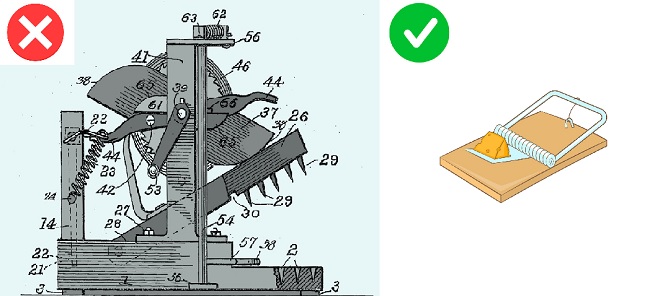
OK, if we're a Swiss Army knife, with 3 attachments, then we're somewhat manageable. Or you can buy construction software like the picture above and spend the next year or two trying to figure it out! Then again, it may be the right decision for your company (there's a buyer for every product out there).
Scott Hutchinson
scott@builditsystems.com
1 866 585 5050 ext 1
by scott ·
Mar 22 2008, 05:14 PM
categories: Technical Stuff
"Does BuildIT have a Critical Path?" — we're often asked that question. First, some background:
Critical Path (also known as Critical Path Method, or CPM) is a scheduling method for dealing with multiple activities (or "tasks" as we call them) required to complete a project. The duration of the project is the sum of sequential tasks, with each task having it's own duration.
The relationship between tasks is such that a change in a critical task will most likely change the overall construction timeline, either shrinking it, or extending it. I say "most likely" because in construction, scheduling tends to be more of an art than a science, and often there are negotiated activities that take place to ensure the project is kept "on track", like doubling up of trades, working on non-working days, and working longer hours in the day.
CPM is taught at the university level as part of construction project management. Tonnes of books are written on it. Thick ones, expensive ones. There is a Project Management Institute that teaches and certifies project managers. There is a science behind CPM, and some big words /phrases that come along for the ride:
- predecessors/successors
- resource levelling
- sequential dependencies / linked tasks
- float
- crashing / fast tracking
BuildIT made the decision years ago to provide a better solution to small to mid sized construction professionals, many of whom are artisans, business owners, and do too much without enough hours in the day. We saw the landscape of software available to this audience, and quite frankly, it was way too complicated and costly for the majority of the folks we had interviewed, and continue to speak to on a daily basis.
There is not a week that goes by that we don't hear from someone that "we tried software X for scheduling, and it was way more than what we needed". How can that be if it had all the bells, whistles, buzz words, fancy computer algorithms and a printed Gantt chart that would make any Ph.D. drool!?
There is enough complicated, complex, "enterprise level" software out there for those of you that need it. Call me and I'll make some recommendations if you feel you need more than what we offer. One project manager quipped that "you could run a small country with [Microsoft Project]" – but that's not what our customers are up to!
The fact is, we wanted to offer a simpler scheduling solution that gets the job done without a bunch of overhead.
Consider a simple schedule with a dozen or more tasks. All tasks are displayed in chronological order based on start date. That's how most of you would view a schedule.
Now say that something happens which affects the schedule. There is a delay in a shipment, the crane broke down, someone forgot to show up on Monday, AND you forgot your wife's birthday – all throwing a wrench into the system.
You have some options:
1. Modify one task, independent of the rest of the schedule
2. Modify a selection of tasks, independent of the rest of the schedule
or what I refer to as our Critical Path option:
3. Select a task, extend or reduce its duration, and choose a function to change ALL SUBSEQUENT tasks by the same number of working days.
Presto, you essentially are saying that the entire schedule from that point forward is "critical", and all tasks are bumped (accounting for non working days such as weekends and stat holidays).
There are also other strategies for effectively managing critical paths within a BuildIT schedule.
For instance, say you had 100 tasks for a project, and 70 of them were critical (the other 30 were there, placed appropriately in the timeline, but were not tied to the critical path in any way). You can assigned those tasks a CRITICAL code, then just filter on that code to view the critical path, and adjust as necessary.
For more help with how to use BuildIT to accomplish your scheduling goals without the nightmare of task linkages, sequential dependencies and arrows all over the page, call BuildIT support.
Scott Hutchinson (putting the "simple" into scheduling)
scott@builditsystems.com
1 866 585 5050 ext 1
by scott ·
Mar 18 2008, 09:00 PM
categories: BuildIT Advantage
If you're a construction professional, and you're using Outlook for email, this article is for you, big time.
I admit it. I was an Outlook user ("was" being the operative word).
Then it happened.
I won the "bad sector on hard drive" lottery, and my Outlook email file was gone forever, along with a few critical files on my hard drive. Essentially my hard drive packed it in, and I lost all my personal email.
Bummer. I was ticked. Like the girl in the photo (BTW, she's not related to me, and she doesn't work for BuildIT).
For you non techies, a hard drive is that part of your computer that stores your files, the stuff you create with applications like Word, Excel... important documents, contracts, photos, templates that you've spent hours creating. Over time, the magnetic surface of a hard drive can deteriorate, wreaking havoc for those like me who use computers as a tool only, and aren't at home "under the hood" doing surgery on our own PC's.
The computer fix-it guys told me it happens all the time. People come in to their store desperate to retrieve their files off a broken computer. People in tears, like the lady who lost all her wedding photos, a problem some us that grew up with a 35mm camera and bulky photo albums never had to deal with. They said it's best to just get a new hard drive and start all over again.
For those who are fortunate to have some or all of their data retrievable, that process can take hours... and it comes at a cost. Depending on the severity, data recovery can be in the $1000's for some individuals/companies.
Now for the good news - since I work for BuildIT, I have my own BuildIT account, with email and file storage. All my email, contacts, and files that I had uploaded over the years to the system were safe, accessible, ready and waiting for me. This whole event just further reinforced my opinion of web based systems - they are, as Gretzky said, "where the puck is going". They're the smart choice for construction professionals who want to sleep easier at night, not having to worry about doing data backups or hard drives crashing.
Just imagine if you are one of the lucky ones who is on board with BuildIT. You're computer crashes, falls off the hood of your truck, or worse yet, gets stolen. What do you do? Just jump on to another computer, log on to BuildIT and you're back in biz... literally, within minutes.
Now, what's that worth to you? I'd say that's worth the price of admission right there. So if you're checking out construction software, and they're offering you a "download" or a box with some disks in it, well, I hope you have a good back up plan in place. Otherwise, take door number 2 and give BuildIT a shot at solving your problems.
Want to learn more about the advantages of web based systems for construction? Click here.
Or give me a call, and I'll share some more tales from the front lines, and what you can do to avoid the pain.
Scott Hutchinson
scott@builditsystems.com
1 866 585 5050 ext 1
|
| BuildIT gives you everything you need to succeed and is simple to use.
|
|
“It's the most impressive collection of tools assembled for construction management success.”
|
| Start your free test drive now.
|
|